

파이썬 | 프로그램 GUI 툴킷 Thinter
정라잇 |
요약
Thinter 는 파이썬에서 사용하는 Tk GUI 툴킷입니다.
메뉴얼 : 바로가기
한글 메뉴얼 : 바로가기
사용
from tkinter import *
from tkinter import ttk

ws = Tk()
ws.title("PythonGuides")

tv = ttk.Treeview(ws, columns=(1, 2, 3), show='headings', height=8)
tv.pack()

tv.heading(1, text="name")
tv.heading(2, text="eid")
tv.heading(3, text="Salary")

def update_item():
    selected = tv.focus()
    temp = tv.item(selected, 'values')
    sal_up = float(temp[2]) + float(temp[2]) * 0.05
    tv.item(selected, values=(temp[0], temp[1], sal_up))

tv.insert(parent='', index=0, iid=0, values=("vineet", "e11", 1000000.00))
tv.insert(parent='', index=1, iid=1, values=("anil", "e12", 120000.00))
tv.insert(parent='', index=2, iid=2, values=("ankit", "e13", 41000.00))
tv.insert(parent='', index=3, iid=3, values=("Shanti", "e14", 22000.00))

Button(ws, text='Increment Salary', command=update_item).pack()

style = ttk.Style()
style.theme_use("default")
style.map("Treeview")

ws.mainloop()
오류 해결
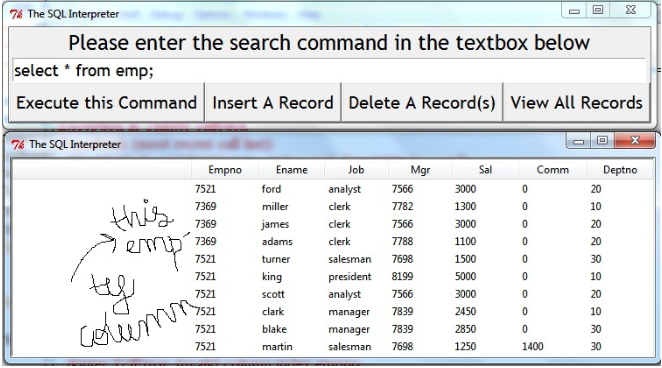
t = ttk.Treeview(w)
t['show'] = 'headings'
위와 같이 첫번째 열이 보이는 현상이 있습니다. 첫번째 열은 식별자입니다.
이를 제거하기 위해서는 위의 코드를 적용함으로서 해결할 수 있습니다.