

워드프레스 | 메뉴 생성 : 커스터마이저 API
정라잇 |
요약
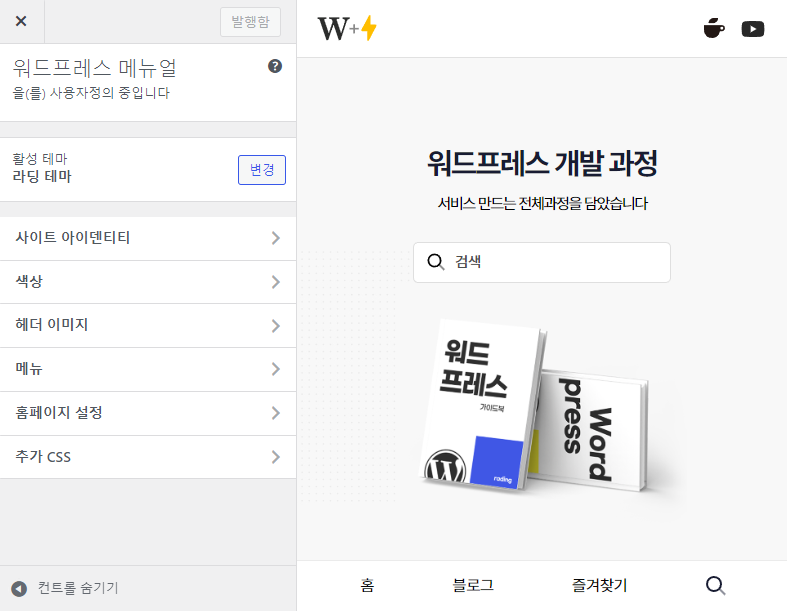
사용자 정의 메뉴를 개발에 활용할 수 있습니다.
메뉴를 생성할 때 Panel > Section > Control 순서로 만들어야 합니다.
Panel 을 제외한 Section > Control 로도 만들 수도 있습니다.
생성
/**
 * 사용자 정의 추가하기
 */
function mytheme_customize_register( $wp_customize ) {
   // 사용자 정의하기 추가 (i.e. 패널, 섹션, 설정 & 컨트롤)
};
add_action( 'customize_register', 'mytheme_customize_register' );
사용자 정의 활용
function theme_customizer_function($wp_customize)
{
    // 패널 추가
    $wp_customize->add_panel('landing_panel' , array(
        'title' => '패널',
        'priority' => 10,
        'capability' => 'edit_theme_options',
    ));
    // 섹션 추가
    $wp_customize->add_section('landing_page_home' , array(
        'title' => '홈 섹션',
        'description' => __('커스텀 홈 섹션'),
        'panel' => 'landing_panel',
    ));

    // 컨트롤 추가
    $wp_customize->add_setting('landing_page_home' , array(
        'default' => __('정리'),
    ));
    $wp_customize->add_control('landing_page_home' , array(
        'title' => '홈 섹션',
        'description' => __('커스텀 홈 섹션'),
        'panel' => 'landing_panel',
    ));

    // 섹션 추가
    $wp_customize->add_setting('landing_textarea' , array(
        'default' => __('내용 입력'),
    ));
    $wp_customize->add_section('landing_textarea' , array(
        'label' => '정보',
        'description' => 'landing_page_home',
        'priority' => 2,
    ));

    // 컨트롤 추가
    $wp_customize->add_setting('landing_dropdown' , array(
        'default' => '설명',
    ));
    $wp_customize->add_control('landing_dropdown' , array(
        'label' => '링크 선택',
        'priority' => 3,
        'section' => 'landing_page_home',
        'type' => 'select',
        'choices' => array(
            'about' => '설명',
            'contact' => '오시는길',
            'portfolio' => '포트폴리오',
        ),
    ));
}
add_action('customize_register' , 'theme_customizer_function');
출력하기
<?php echo get_theme_mod( 'background_color' ); ?>

<a href="<?php echo esc_url( get_theme_mod( 'talash_url' ) ); ?>">
코드를 활용하여 출력하려면 get_theme_mod()함수를 활용해야 합니다. 저장된 인수 제목을 통해 가져오면 됩니다.
이미지 컨트롤 가져오기
function theme_customizer_function($wp_customize)
{
    // 패널 추가
    $wp_customize->add_panel('landing_panel' , array(
        'title' => '패널',
        'priority' => 10,
        'capability' => 'edit_theme_options',
    ));
    // 섹션 추가
    $wp_customize->add_section('landing_page_home' , array(
        'title' => '홈 섹션',
        'description' => __('커스텀 홈 섹션'),
        'panel' => 'landing_panel',
    ));

    // 컨트롤 추가
    $wp_customize->add_control(new WP_Customize_Image_Control($wp_customize, 'landing_image', array(
    'label' => '배경 이미지',
    'section' => 'landing_page_home',
    'priority' => 5,
)));
}
add_action('customize_register' , 'theme_customizer_function');
<?php echo get_theme_mod( 'landing_image' ); ?>순서도
| 이름 | ID | 우선 순위 |
| 사이트 제목 & 태그 | title_tagline | 20 |
| 색상 | colors | 40 |
| 헤더 이미지 | header_image | 60 |
| 배경 이미지 | background_image | 80 |
| 메뉴 (패널) | nav_menus | 100 |
| 위젯 (패널) | widgets | 110 |
| 고정 전면 페이지 | static_front_page | 120 |
| 기본값 | 160 | |
| 추가 CSS | custom_css | 200 |